



















How Mobile Applications Communicate With Servers: Understanding APIs, HTTP, Databases, and Real-Time Data Exchange

Have you ever wondered what happens when you open a mobile application, log into your account, send a message, upload a photograph, or check your wallet balance?
Although these activities may appear simple from the user's perspective, they involve several sophisticated processes happening between the mobile device and remote computer systems.
Most modern mobile applications depend on communication with servers to retrieve information, authenticate users, synchronize data, process transactions, store files, and provide services.
For example, when you open a social networking application, your phone may need to retrieve your profile information, load recent posts, download photographs, check notifications, and determine whether you have received new messages.
Much of this information is not permanently stored on your phone. It is maintained on remote servers and delivered to your device when required.
This communication happens through technologies such as Application Programming Interfaces (APIs), HTTP and HTTPS protocols, network connections, data serialization formats, authentication mechanisms, and server-side application software.
Understanding how mobile applications communicate with servers is essential for mobile application developers, backend engineers, cybersecurity professionals, and anyone interested in how modern digital platforms operate.
In this article, we will explore the complete communication process, from the moment a user taps a button to the moment the server processes a request and returns information to the mobile application.
1. What Is Client-Server Communication in Mobile Applications?
Client-server communication is a computing model in which two or more systems exchange information over a network.
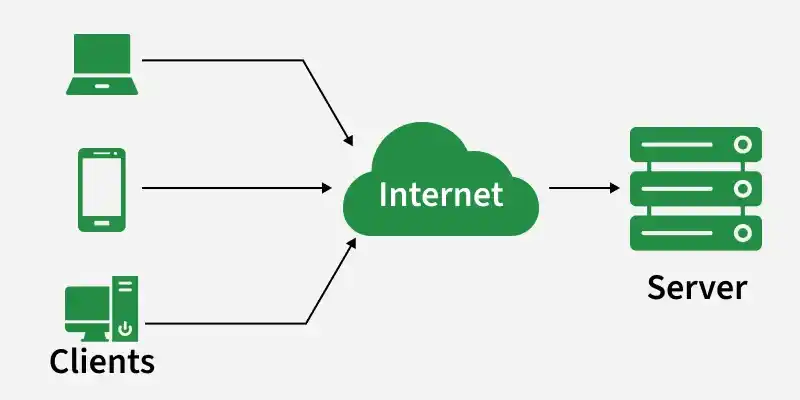
In mobile application development, the mobile application usually acts as the client, while a remote computer system acts as the server.
The client sends requests to the server, and the server processes those requests and returns appropriate responses.
For example, imagine opening a mobile banking application.
You enter your account details and request your current balance.
The mobile application does not necessarily contain your actual account balance. Instead, it sends a request to the banking server.
The server verifies your identity, retrieves the relevant account information from its database, and returns the authorized balance to your application.
The mobile application then displays the result.
This interaction is called client-server communication.
The Two Main Participants
The Mobile Client
The client is the application installed on the user's smartphone.
Examples include:
-
Android applications.
-
iOS applications.
-
Mobile banking applications.
-
Social networking applications.
-
E-commerce applications.
-
Learning platforms.
-
Messaging applications.
The client is responsible for presenting information, collecting user input, sending requests, receiving responses, and displaying results.
The Server
The server is a remote computer or computing environment responsible for processing requests and managing application resources.
It may contain:
-
Backend application software.
-
Databases.
-
Authentication services.
-
File storage systems.
-
API endpoints.
-
Business logic.
-
Payment integrations.
-
Notification services.
A mobile application and its server work together to provide the complete application experience.
2. Understanding the Architecture of Mobile Applications
A typical mobile application communicates with several backend components rather than one single server program.
A simplified architecture looks like this:
             MOBILE APPLICATION
                Android / iOS
                     |
                     |
              Internet Connection
                     |
                     v
                API SERVER
                     |
              Request Processing
                     |
          +----------+----------+
          |          |          |
          v          v          v
      DATABASE   FILE STORAGE  AUTH SERVICE
          |          |          |
          +----------+----------+
                     |
                     v
               SERVER RESPONSE
                     |
                     v
              MOBILE APPLICATION
Each component has a specific responsibility.
Mobile Application
The mobile application provides the interface through which users interact with the system.
It collects information, validates certain inputs, and sends requests to the backend.
API Server
The API server receives incoming requests, checks their validity, executes application logic, and returns responses.
Database
The database stores structured information such as:
-
User accounts.
-
Password hashes.
-
Posts.
-
Comments.
-
Messages.
-
Product information.
-
Transaction records.
-
Application settings.
File Storage
File storage systems manage large or binary files such as:
-
Profile photographs.
-
Videos.
-
Documents.
-
Audio recordings.
-
Uploaded attachments.
These files may be stored on the same server, a separate storage server, or a cloud storage platform.
Authentication Service
Authentication services verify user identities and issue or validate credentials used to access protected resources.
In larger systems, authentication may be handled by a separate service.
3. What Is an API, and Why Do Mobile Applications Need It?
An Application Programming Interface (API) is a defined mechanism through which different software systems communicate and exchange information.
In mobile application development, APIs allow the mobile application to communicate with backend services without directly accessing the server's database.
For example, imagine a social networking application that needs to retrieve a user's profile.
Instead of connecting directly to MySQL, the mobile application sends an API request.
The API server processes the request, retrieves the appropriate information, and returns a response.
This separation is important because it allows the backend to control access to data and enforce application rules.
Practical Example: Retrieving a User Profile
Suppose a mobile application needs to retrieve a profile belonging to user number 125.
The application sends a request to an API endpoint:
GET /api/users/125 HTTP/1.1
Host: example.com
Accept: application/json
Authorization: Bearer YOUR_ACCESS_TOKEN
The server receives the request and performs several operations:
-
Checks whether the request is valid.
-
Validates the access token.
-
Checks whether the user is authorized to access the requested profile.
-
Retrieves the profile information from the database.
-
Formats the result.
-
Returns the response to the application.
A successful response might look like this:
{
  "success": true,
  "data": {
    "id": 125,
    "name": "John",
    "username": "johntech",
    "email": "john@example.com",
    "profile_picture": "https://example.com/uploads/john.webp"
  }
}
The mobile application receives the JSON response and uses the information to display the profile.
The API acts as the communication bridge between the application and the backend.
4. How HTTP and HTTPS Enable Mobile Applications to Communicate
Most mobile applications communicate with backend servers through HTTP-based protocols.
HTTP stands for Hypertext Transfer Protocol.
It defines how clients and servers exchange requests and responses.
HTTPS is HTTP protected by Transport Layer Security (TLS).
HTTPS encrypts communication between the client and server, helping protect information against interception and unauthorized modification while it travels across the network.
How an HTTP Request Works
Consider a user opening a news application and requesting the latest articles.
The mobile application sends an HTTP request to the server.
The request contains information such as:
-
Request method.
-
Destination URL.
-
Headers.
-
Authentication information.
-
Optional request body.
The server receives the request and processes it.
It then returns an HTTP response containing a status code, headers, and, when applicable, response data.
Common HTTP Methods Used by Mobile Applications
GET
Used to retrieve information.
Example:
GET /api/articlesThis requests a list of articles.
POST
Used to submit information or initiate an operation.
Example:
POST /api/loginThis submits login information.
PUT
Generally used to replace a resource or update it.
Example:
PUT /api/users/125PATCH
Used to partially update a resource.
Example:
PATCH /api/users/125DELETE
Used to request the deletion of a resource.
Example:
DELETE /api/articles/45The exact meaning of an operation depends on the API design and server implementation.
Understanding HTTP Status Codes
When a server receives a request, it returns a status code indicating the result.
| Status Code | Meaning | Example |
|---|---|---|
| 200 | OK | Data retrieved successfully |
| 201 | Created | New account or resource created |
| 204 | No Content | Operation completed without a response body |
| 400 | Bad Request | Invalid request information |
| 401 | Unauthorized | Authentication is missing or invalid |
| 403 | Forbidden | Access is not permitted |
| 404 | Not Found | Requested resource does not exist |
| 422 | Unprocessable Content | Validation failed |
| 429 | Too Many Requests | Rate limit exceeded |
| 500 | Internal Server Error | Backend encountered an unexpected problem |
| 503 | Service Unavailable | Service is temporarily unavailable |
These codes help mobile applications determine what to do after a request.
For example, if an API returns 401, the application may ask the user to authenticate again or attempt a supported token-refresh procedure.
5. Understanding JSON: How Mobile Applications Exchange Data
JSON stands for JavaScript Object Notation.
It is a lightweight data-interchange format widely used in mobile applications and web APIs.
JSON makes it possible to represent structured information in a format that different programming languages can understand.
For example, a server may return the following user information:
{
  "id": 25,
  "name": "Michael",
  "age": 24,
  "verified": true,
  "skills": [
    "Programming",
    "Networking",
    "Cybersecurity"
  ]
}
The mobile application receives this information and converts it into objects or data structures that its programming language can use.
How Android Reads JSON
An Android application written in Kotlin can use serialization libraries to process JSON.
For example:
@Serializable
data class User(
    val id: Int,
    val name: String,
    val age: Int,
    val verified: Boolean
)
A JSON response can then be converted into a Kotlin object using an appropriate serialization library.
How iOS Reads JSON
An iOS application written in Swift can use the Codable system.
struct User: Codable {
    let id: Int
    let name: String
    let age: Int
    let verified: Bool
}
The application can decode the JSON response into the corresponding Swift structure.
Why JSON Is Popular
JSON is widely used because it is:
-
Human-readable.
-
Relatively lightweight.
-
Supported by many programming languages.
-
Suitable for structured information.
-
Easy to transmit over HTTP.
-
Supported by most modern API frameworks.
Other formats, including Protocol Buffers, MessagePack, and CBOR, are also used when specific performance or data-size requirements justify them.
6. What Happens When a User Logs Into a Mobile Application?
Authentication is one of the most important examples of client-server communication.
Consider a user opening a mobile banking application and entering an email address and password.
What happens behind the scenes?
Step 1: The User Enters Login Information
The application collects the credentials.
For example:
Email: user@example.com
Password: ********
Step 2: The Application Sends an HTTPS Request
The mobile application sends the credentials to the authentication endpoint.
A simplified request might look like this:
POST /api/login
Content-Type: application/json
Request body:
{
  "email": "user@example.com",
  "password": "user_password"
}
In a real application, the password must be transmitted only over properly secured HTTPS and must never be written into application logs or exposed unnecessarily.
Step 3: The Server Receives the Credentials
The backend receives the request.
It validates the request structure and checks whether the submitted account information is acceptable.
Step 4: The Server Verifies the Password
The server retrieves the stored password hash and verifies the submitted password using an appropriate password-hashing algorithm.
Passwords should not be stored as plain text.
Common password-hashing technologies include Argon2id and bcrypt.
Step 5: The Server Generates an Authentication Credential
If authentication succeeds, the server may issue an access token.
Some systems also issue a refresh token.
These credentials allow the application to access protected resources without sending the user's password with every request.
Step 6: The Application Receives the Response
A simplified response might look like:
{
  "success": true,
  "access_token": "example_access_token",
  "token_type": "Bearer",
  "expires_in": 3600
}
Step 7: The Application Stores the Credentials Securely
The mobile application stores the credentials using appropriate platform security mechanisms.
Android applications can use Android Keystore-backed protection and secure storage designs.
iOS applications commonly use Keychain.
The application should avoid storing sensitive authentication information in ordinary unprotected preferences or files.
Step 8: The User Accesses Protected Features
When the application requests private information, it includes the access token.
For example:
GET /api/profile
Authorization: Bearer example_access_token
The server validates the token before returning protected information.
This is how a mobile application maintains an authenticated session.
7. How Mobile Applications Retrieve Data From Databases
Mobile applications normally do not connect directly to remote application databases.
Instead, they communicate with backend APIs that interact with databases.
This separation is important for security, maintainability, and application architecture.
Consider a social networking application that needs to display the latest posts.
The Complete Process
Step 1: The user opens the newsfeed.
Step 2: The application sends a request to the backend.
GET /api/posts?limit=10&page=1Step 3: The backend validates the request and identifies the authenticated user.
Step 4: The backend executes the appropriate database query.
A simplified SQL query might look like:
SELECT
    id,
    user_id,
    content,
    created_at
FROM posts
ORDER BY created_at DESC
LIMIT 10;
Step 5: The database returns the requested records.
Step 6: The backend formats the information into JSON.
Step 7: The mobile application receives the response.
Step 8: The application displays the posts in the newsfeed.
This process allows the application to retrieve current information without having direct database access.
Why Direct Database Connections Are Dangerous
Connecting a mobile application directly to a production database creates serious security risks.
For example:
-
Database credentials could be extracted from the application.
-
Attackers could attempt unauthorized database access.
-
Business logic could be bypassed.
-
Database queries could be manipulated.
-
Sensitive records could be exposed.
A properly designed backend API acts as a controlled access layer between the mobile application and the database.
8. How Mobile Applications Upload Images, Videos, and Documents
Mobile applications frequently need to send files to remote servers.
Examples include:
-
Uploading profile pictures.
-
Posting photographs.
-
Sending videos.
-
Submitting assignments.
-
Sharing documents.
-
Uploading identification documents.
Unlike ordinary JSON requests, file uploads commonly use multipart/form-data or another suitable binary-transfer mechanism.
Practical Example: Uploading a Profile Photograph
Imagine a user selecting a photograph from their phone's gallery.
The application needs to transfer the selected file to the server.
The process generally involves:
-
Requesting appropriate access to the selected media.
-
Allowing the user to choose a photograph.
-
Reading the selected file through the platform's supported file-access mechanism.
-
Sending the file to an upload API.
-
Authenticating the request.
-
Validating the uploaded file on the server.
-
Storing the file in an appropriate storage system.
-
Saving the file reference in the database.
-
Returning the resulting file URL or resource identifier.
A simplified HTTP request might look like:
POST /api/profile/photo
Authorization: Bearer ACCESS_TOKEN
Content-Type: multipart/form-data
The uploaded file is transmitted as part of the multipart request.
The server should validate file size, content type, file signature, authorization, and any relevant image-processing requirements.
Where Are Uploaded Files Stored?
Depending on the architecture, uploaded files may be stored in:
-
Local server storage.
-
Object storage.
-
Cloud storage.
-
Dedicated media servers.
For large applications, object storage is often preferable to relying entirely on the main application server's local filesystem.
A CDN can subsequently distribute public or appropriately authorized media resources.
9. How Mobile Applications Communicate in Real Time
Traditional HTTP communication usually follows a request-response pattern.
The client sends a request, and the server returns a response.
However, certain applications require information to be exchanged continuously or delivered immediately when an event occurs.
Examples include:
-
Messaging applications.
-
Online games.
-
Live trading platforms.
-
Collaborative editing tools.
-
Live tracking applications.
-
Real-time notification systems.
Several technologies support this type of communication.
9.1 WebSockets
WebSockets provide a persistent, bidirectional communication channel between a client and a server.
Unlike ordinary HTTP request-response communication, a WebSocket connection allows both parties to send messages independently after the connection has been established.
For example, imagine a messaging application.
A user sends a message.
The application transmits the message through an established WebSocket connection.
The server receives the message, stores it, and forwards it to the intended recipient if that recipient is connected.
The recipient's application receives the message without continuously requesting the server for new messages.
A simplified communication flow looks like this:
       USER A APPLICATION
               |
               | WebSocket
               v
          MESSAGE SERVER
               |
          Save Message
               |
               v
       USER B APPLICATION
               |
               v
         Display Message
WebSockets are useful when frequent, low-latency, two-way communication is required.
9.2 Server-Sent Events (SSE)
Server-Sent Events provide a persistent HTTP connection through which a server can send event updates to a client.
Unlike WebSockets, SSE is primarily one-directional.
The server sends updates, while the client uses separate HTTP requests to submit information.
SSE can be useful for:
-
Live dashboards.
-
Progress updates.
-
Monitoring systems.
-
Activity feeds.
-
Real-time status information.
9.3 Polling
Polling involves repeatedly asking a server whether new information is available.
For example, a messaging application may send a request every five seconds:
GET /api/messages/newThe server returns any available new messages.
Polling is relatively simple to implement, but frequent requests can consume unnecessary network resources and battery power.
9.4 Long Polling
Long polling is a variation of polling in which the server holds a request open until new information becomes available or a timeout occurs.
Once the server responds, the client immediately makes another request.
This reduces the number of unnecessary empty responses compared with frequent ordinary polling.
However, it still creates repeated HTTP request cycles.
Choosing the Appropriate Technology
| Technology | Communication Type | Common Applications |
|---|---|---|
| HTTP requests | Request and response | Profiles, feeds, transactions |
| WebSockets | Bidirectional | Chat, live games |
| SSE | Server to client | Live dashboards, updates |
| Polling | Repeated requests | Simple status checking |
| Long polling | Delayed server response | Event notifications |
The right choice depends on latency requirements, connection management, infrastructure, and application behavior.
10. How Push Notifications Reach Mobile Applications
Push notifications allow applications to receive notifications even when they are not actively open.
For example, when someone sends you a message, you may receive a notification on your phone.
The application does not need to keep an active connection to its own backend at all times for this to work.
Android and iOS provide push notification infrastructure through their respective services.
For Android, Firebase Cloud Messaging (FCM) is commonly used.
For Apple devices, Apple Push Notification service (APNs) is used.
How Push Notifications Work
Consider a social networking application.
A user receives a new message.
The process may look like this:
-
The sender submits a message to the application server.
-
The server stores the message.
-
The server identifies the recipient's registered push token.
-
The server sends a notification request to the appropriate push notification service.
-
The notification service routes the message to the recipient's device.
-
The operating system receives the notification.
-
The user sees the notification.
-
When the user opens it, the application may retrieve the actual message from its backend.
The important distinction is that a push notification is often a signal that something has happened.
It does not necessarily contain all the information needed by the application.
For example, a notification might simply contain:
{
  "type": "new_message",
  "conversation_id": 450
}
The application can then retrieve the actual conversation through an authenticated API request.
Push notifications are not guaranteed to be delivered instantly or exactly once. Applications should therefore maintain server-side state and synchronize important information when they resume.
11. How Mobile Applications Handle Slow or Unstable Internet Connections
Mobile applications operate in environments where network connectivity can change frequently.
A user may move between Wi-Fi and mobile data, enter an area with weak signal, or temporarily lose internet access.
A reliable mobile application must account for these situations.
Common Network Problems
-
High latency.
-
Packet loss.
-
Weak Wi-Fi signals.
-
Mobile network interruptions.
-
DNS resolution failures.
-
Server timeouts.
-
Connection resets.
-
Temporary server unavailability.
How Applications Handle Network Failures
Request Timeouts
Applications should define reasonable timeouts so that a request does not wait indefinitely.
Retry Mechanisms
Temporary failures may be retried using controlled exponential backoff.
For example:
First retry: 1 second
Second retry: 2 seconds
Third retry: 4 seconds
Fourth retry: 8 seconds
Actual retry schedules should include appropriate limits and often randomized jitter.
Offline Caching
Applications can store previously retrieved information locally.
This allows users to access certain information without an internet connection.
Request Queuing
Some applications can queue operations until a connection becomes available.
For example, a note-taking application may save a note locally and synchronize it later.
Connection Monitoring
Applications can monitor connectivity changes and adjust their behavior.
However, a device reporting that it is connected to Wi-Fi does not guarantee that the application server is reachable.
12. How Offline Synchronization Works in Mobile Applications
Offline synchronization allows mobile applications to continue working when the internet is unavailable.
It is particularly useful for:
-
Note-taking applications.
-
Learning platforms.
-
Messaging applications.
-
Productivity software.
-
Field-service applications.
-
Document editors.
Practical Example: A Student Using an Offline Learning Application
Imagine a student opening a learning application and downloading study materials before travelling.
Later, the student enters an area without internet access.
The application can still display previously downloaded content.
The student writes notes and saves them locally.
When internet connectivity returns, the application synchronizes the new information with the server.
A Typical Synchronization Process
        MOBILE APPLICATION
                |
                v
          LOCAL DATABASE
                |
          User Makes Changes
                |
                v
          Pending Changes
                |
        Internet Available?
             /       \
           No         Yes
           |           |
           v           v
        Keep Data    Send Changes
        Locally          |
                         v
                   SERVER API
                         |
                         v
                     DATABASE
                         |
                         v
                 Return Updated Data
                         |
                         v
                  Update Local DB
What Is Conflict Resolution?
A synchronization conflict happens when the same data is modified in more than one location before synchronization completes.
For example:
-
A user edits a document offline on their phone.
-
The same document is modified from a laptop.
-
The phone reconnects to the internet.
The system must decide how to handle both versions.
Possible strategies include:
-
Last-write-wins.
-
Version-based conflict detection.
-
Manual conflict resolution.
-
Field-level merging.
-
Operational transformation.
-
Conflict-free replicated data types (CRDTs), where appropriate.
The correct strategy depends on the application and the importance of preserving user changes.
13. Understanding API Authentication and Access Tokens
Mobile applications must protect access to private server resources.
This is why authentication mechanisms are essential.
One common approach is token-based authentication.
After successful login, the backend issues an access token.
The application includes the token in requests to protected API endpoints.
Example:
GET /api/account
Authorization: Bearer ACCESS_TOKEN
The backend validates the token and determines whether the request is authorized.
What Is a JWT?
JSON Web Token (JWT) is a token format used to represent claims between systems.
A JWT typically contains three parts:
-
Header.
-
Payload.
-
Signature.
A JWT may contain information such as:
-
User identifier.
-
Token issuer.
-
Expiration time.
-
Intended audience.
-
Other application-specific claims.
A signed JWT is not automatically encrypted.
Its payload can generally be decoded by anyone who obtains it, so sensitive information should not be placed inside it without appropriate encryption.
Access Tokens and Refresh Tokens
Access tokens are commonly short-lived credentials used to access protected resources.
Refresh tokens are used to obtain new access tokens without requiring the user to enter their password again.
Refresh tokens should be protected carefully and rotated or revoked according to the application's security design.
Applications should also have appropriate procedures for handling expired tokens, account logout, and compromised credentials.
14. How DNS Helps Mobile Applications Find Servers
Before a mobile application can communicate with a server using a domain name, the device needs to determine the appropriate network address.
This is where the Domain Name System (DNS) becomes important.
DNS translates domain names into IP addresses.
For example:
api.example.commay resolve to an IP address associated with the API infrastructure.
A simplified process is:
-
The mobile application requests a resource from
api.example.com. -
The operating system or DNS resolver checks available DNS information.
-
If necessary, a DNS query is sent to a resolver.
-
The resolver obtains the required DNS record.
-
The device receives the appropriate IP address.
-
The application establishes a network connection to the server.
DNS caching can reduce the need to repeat the resolution process for every request.
Some applications use additional technologies, such as DNS over HTTPS, depending on the device and network configuration.
15. How TLS Encryption Protects Communication Between Mobile Apps and Servers
Mobile applications frequently transmit sensitive information.
This includes:
-
Login credentials.
-
Personal information.
-
Financial information.
-
Private messages.
-
Authentication tokens.
-
Uploaded documents.
Sending this information over an unencrypted connection can expose it to interception.
HTTPS uses TLS to protect communication between the application and server.
How TLS Works at a High Level
When a mobile application connects to an HTTPS endpoint:
-
The client initiates a TLS handshake.
-
The server presents its digital certificate.
-
The client validates the certificate and hostname.
-
The parties negotiate cryptographic parameters.
-
They establish shared session keys.
-
Subsequent application data is encrypted and authenticated.
This helps protect data while it travels between the device and server.
Why Certificate Validation Matters
A mobile application should properly validate server certificates.
Disabling certificate validation or accepting every certificate creates serious security vulnerabilities.
Some applications also implement certificate pinning as an additional security measure.
Certificate pinning restricts which certificates or public keys the application trusts for a particular server.
However, pinning requires careful certificate rotation and recovery planning to prevent legitimate server certificate changes from breaking application connectivity.
16. REST APIs vs GraphQL: Different Ways Mobile Applications Retrieve Data
Mobile applications can communicate with backend services using different API architectural approaches.
Two widely used approaches are REST and GraphQL.
REST APIs
REST is an architectural style commonly used for designing web APIs.
REST APIs often organize resources around URLs.
For example:
GET    /api/users/25
GET    /api/users/25/posts
POST   /api/posts
PATCH  /api/posts/100
DELETE /api/posts/100
REST APIs commonly use JSON for data exchange.
They are widely supported and relatively straightforward to implement.
GraphQL
GraphQL is a query language and runtime for APIs.
It allows clients to request specific fields and related information.
For example:
query {
  user(id: 25) {
    name
    username
    posts {
      id
      content
    }
  }
}
The server returns the requested information.
GraphQL can help mobile applications retrieve related data efficiently, particularly when interfaces need different combinations of information.
However, it introduces additional considerations involving query complexity, authorization, caching, and performance.
REST vs GraphQL
| Feature | REST | GraphQL |
|---|---|---|
| Structure | Resource-based endpoints | Schema and queries |
| Data selection | Usually defined by endpoint | Client selects requested fields |
| Number of endpoints | Often multiple | Commonly one primary endpoint |
| Caching | Well-supported HTTP caching patterns | Often requires additional caching design |
| Complexity | Relatively straightforward | More complex schema and query management |
| Common use | General mobile and web APIs | Applications needing flexible data retrieval |
Neither approach is universally better. The correct choice depends on application requirements and backend architecture.
17. How Mobile Applications Communicate With Third-Party Services
Modern mobile applications frequently integrate external services rather than implementing every capability themselves.
For example, an e-commerce application may integrate:
-
Payment gateways.
-
Mapping services.
-
Email delivery services.
-
SMS providers.
-
Push notification platforms.
-
Analytics services.
-
Cloud storage.
-
Identity verification services.