


















Every day, millions of people open their browsers, type a website address, and press Enter. Within seconds, websites appear on their screens, displaying images, text, videos, and interactive features.
The process seems simple, but several important technologies work together behind the scenes to make it happen.
From finding the correct server to transferring website files and displaying the final page, your browser performs a series of operations in a matter of seconds.
So, what actually happens when you type a website URL into your browser?
Let's break it down.
1. The Browser Reads and Interprets the URL
The first step begins when you enter a website address, such as:
https://www.example.com
Your browser examines the URL to understand where you want to go and how to access the website.
A typical URL contains several components:
-
HTTPS: The protocol used to establish a secure connection.
-
www: A subdomain that may be used by the website.
-
example.com: The domain name identifying the website.
-
Path: An optional section that directs the browser to a specific page or resource.
After interpreting the address, the browser determines how to locate the website.
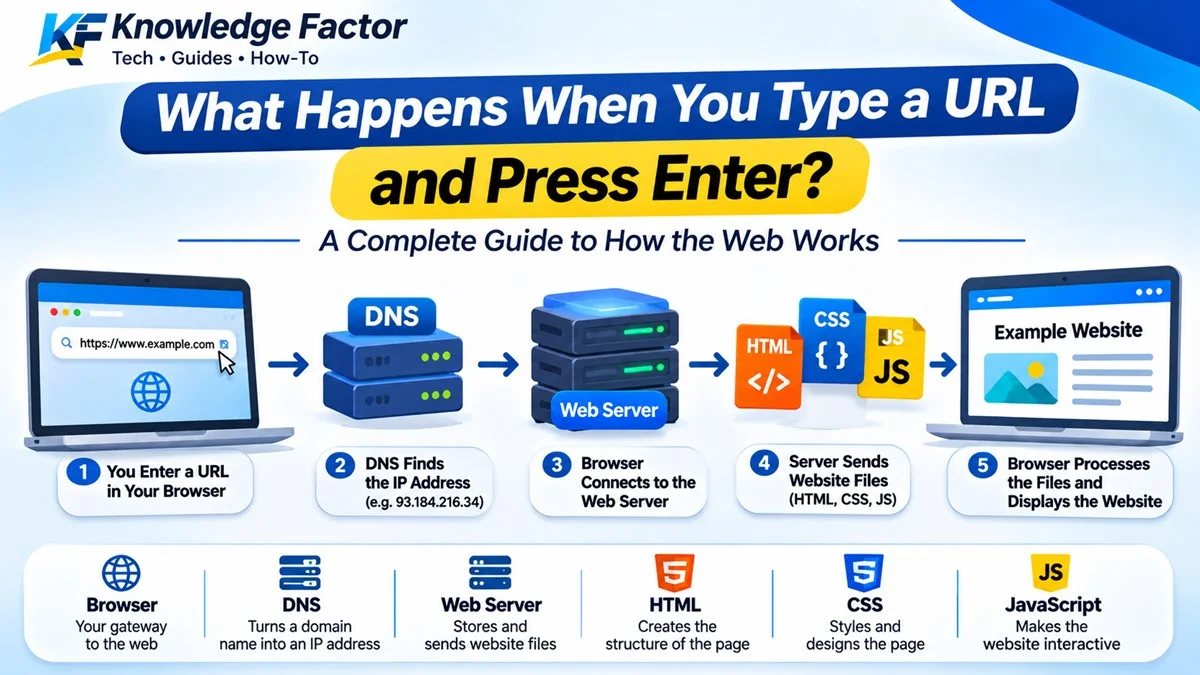
2. DNS Translates the Domain Name Into an IP Address
Computers communicate with one another using IP addresses rather than human-friendly domain names.
For example, while you can easily remember example.com, computers need an IP address to identify the server hosting the website.
This is where the Domain Name System (DNS) comes in.
DNS works like the internet's phonebook. It translates a domain name into the corresponding IP address.
When you enter a website address, your browser may first check its DNS cache. If the information is not available, the request can move through other DNS resolvers until the correct IP address is found.
Once the IP address is obtained, your browser knows where to send its request.
3. The Browser Establishes a Connection With the Server
After discovering the server's IP address, the browser needs to establish a connection.
For traditional HTTP/1.1 and HTTP/2 connections, this typically involves a process called the TCP three-way handshake.
The browser and server exchange three messages:
-
SYN: The browser requests to establish a connection.
-
SYN-ACK: The server acknowledges the request.
-
ACK: The browser confirms the connection.
For HTTPS websites, another important process follows: the TLS handshake.
TLS (Transport Layer Security) helps establish an encrypted connection between the browser and the server. It also allows the browser to verify the server's identity through its digital certificate.
Modern HTTP/3 connections use QUIC over UDP instead of TCP, combining connection establishment and security differently.
Once the secure connection is ready, information can be exchanged safely.
4. The Browser Sends an HTTP Request
With the connection established, the browser sends an HTTP request to the server.
An HTTP request tells the server what resource the browser wants.
For example, when you visit a website's homepage, your browser sends a request asking the server to provide the homepage.
The request may contain:
-
The requested URL.
-
The HTTP method, usually GET for retrieving a page.
-
Browser information.
-
Cookies and other relevant headers.
-
Additional information required by the server.
The server receives the request and determines how to respond.
5. The Web Server Processes the Request
The web server receives the incoming request and decides what content or service should be returned.
Depending on how the website is built, the server may:
-
Retrieve a static HTML file.
-
Execute backend code written in PHP, Python, Node.js, or another programming language.
-
Retrieve information from a database.
-
Check user authentication and permissions.
-
Process business logic.
-
Generate a dynamic webpage.
For example, when you log into a social networking platform, the server may check your login credentials, retrieve your profile information, load your latest posts, and prepare the appropriate response.
The server then sends the requested information back to the browser.
6. The Server Sends a Response to the Browser
After processing the request, the server returns an HTTP response.
This response usually contains three important components:
-
Status code: Indicates whether the request was successful or encountered an issue.
-
Response headers: Provide additional information about the returned resource.
-
Response body: Contains the actual content, such as HTML, JSON, or other data.
Some common HTTP status codes include:
-
200 OK: The request was successful.
-
301 Moved Permanently: The requested resource has permanently moved.
-
302 Found: The resource is temporarily available at another location.
-
403 Forbidden: Access to the requested resource is denied.
-
404 Not Found: The requested resource could not be found.
-
500 Internal Server Error: Something went wrong on the server.
If the response contains HTML, the browser can begin processing the webpage.
7. The Browser Builds and Displays the Website
Receiving HTML does not mean the browser has finished its work.
It must interpret the website's code and turn it into something users can see and interact with.
This involves several important processes.
HTML: Building the Structure
HTML (HyperText Markup Language) defines the structure and content of a webpage, including headings, paragraphs, images, links, and other elements.
CSS: Applying the Design
CSS (Cascading Style Sheets) controls how the webpage looks. It determines colors, fonts, spacing, layouts, animations, and responsiveness.
JavaScript: Adding Functionality
JavaScript makes websites interactive. It enables features such as dropdown menus, form validation, notifications, dynamic content, and interactive dashboards.
The browser parses HTML into the Document Object Model (DOM) and CSS into the CSS Object Model (CSSOM).
It then combines the relevant information to calculate how elements should appear on the screen.
The browser performs layout, painting, and compositing to render the final webpage.
This is why a website can transform from lines of code into a fully designed interface within seconds.
8. The Browser Loads Additional Resources
A modern website is rarely made up of HTML alone.
It may also require:
-
Images and icons.
-
CSS stylesheets.
-
JavaScript files.
-
Web fonts.
-
Videos and audio.
-
External libraries and APIs.
The browser makes additional requests to retrieve these resources.
Some resources may be downloaded simultaneously, while others depend on previously loaded files.
To improve performance, browsers can also reuse cached resources instead of downloading everything again.
This is one reason why a website may load faster when you visit it for the second time.
9. The Website Becomes Interactive
Once the browser has processed the necessary resources and rendered the page, you can begin interacting with the website.
You can click buttons, navigate between pages, submit forms, upload files, send messages, and perform other activities.
Many modern websites continue communicating with their servers in the background to retrieve or update information without reloading the entire page.
Technologies such as Fetch API, AJAX, WebSockets, and server-sent events make these interactions possible.
The process continues whenever you request new information or perform an action.
Why Does One Website Load Faster Than Another?
Not all websites load at the same speed. Several factors influence how quickly a webpage becomes available.
Some of the most important include:
-
Server performance: A slow or overloaded server can delay responses.
-
Internet connection: Network speed and latency affect communication.
-
Image optimization: Large, uncompressed images can significantly increase loading time.
-
Code efficiency: Poorly optimized HTML, CSS, and JavaScript can slow down rendering.
-
Caching: Proper caching reduces repeated downloads and server requests.
-
Content Delivery Networks (CDNs): CDNs distribute website resources across multiple locations, helping users access content from servers closer to them.
Website developers use these techniques to improve performance and provide a smoother browsing experience.
Conclusion
Typing a website URL into your browser triggers a remarkable sequence of operations involving DNS, networking protocols, web servers, databases, HTML, CSS, JavaScript, and browser rendering engines.
Although the entire process may take only a few seconds, multiple technologies work together to make it possible.
Understanding this process provides a foundation for learning web development, networking, cybersecurity, and how the internet works.
The next time you enter a website address and press Enter, remember that your browser is doing much more than simply opening a webpage. It is coordinating several complex operations to bring the internet to your screen.