



















DNS Explained: How Domain Names Find Websites and Connect You to the Internet

Every day, millions of people access websites by typing simple addresses such as Google.com, Facebook.com, or Wikipedia.org into their browsers.
These domain names are easy to remember and convenient to use. But computers do not primarily communicate using familiar website names. They rely on numerical IP addresses to identify devices and servers across networks.
So, how does your browser know which server hosts a website when you enter its domain name?
How does the internet translate a human-readable address into the numerical address required to establish a connection?
The technology responsible for this process is called the Domain Name System (DNS).
DNS is one of the fundamental technologies that make the internet usable. Without it, accessing websites would be considerably more complicated because users would need to remember the IP addresses associated with every online service they visit.
In this article, we will explore what DNS is, how it works, the different types of DNS servers and records, how domain names are resolved, and why DNS is essential to modern internet infrastructure.
1. What Is DNS?
DNS stands for Domain Name System.
It is a distributed naming system that translates human-readable domain names into IP addresses that computers use to locate network resources.
In simple terms, DNS works like the internet's phonebook.
Imagine that you want to call someone. You probably remember their name rather than their telephone number. You look up their name in your contacts to find the corresponding number.
DNS works in a similar way.
When you enter a website address such as www.example.com into your browser, DNS helps identify the IP address associated with that domain name.
The browser can then use that IP address to connect to the appropriate server.
For example:
-
Domain name: www.example.com
-
IPv4 address: 93.184.216.34
The domain name is easier for humans to remember, while the IP address provides the network location required for communication.
DNS supports both IPv4 and IPv6 addresses, allowing the internet to accommodate different network addressing systems.
2. Why Does the Internet Need DNS?
The internet connects billions of devices, servers, and network services across the world.
Each device or service that communicates over an IP network uses IP addressing to identify where information should be sent.
However, remembering numerical addresses for every website would be inconvenient.
Imagine having to remember a different IP address every time you wanted to visit:
-
A search engine.
-
A social networking platform.
-
An online banking service.
-
An educational website.
-
An e-commerce marketplace.
This would make everyday internet usage unnecessarily difficult.
DNS solves this problem by allowing people to use recognizable domain names instead of memorizing numerical addresses.
It also provides several additional benefits:
-
Convenience: Users can access websites using memorable names.
-
Flexibility: Website owners can change hosting infrastructure without necessarily changing their domain names.
-
Scalability: DNS distributes domain information across a global hierarchical system.
-
Load distribution: DNS can return different IP addresses to distribute traffic across multiple servers.
-
Service discovery: DNS can help applications locate services such as mail servers and other network resources.
DNS is therefore more than a simple translation mechanism. It is an essential part of internet infrastructure.
3. How Does DNS Work?
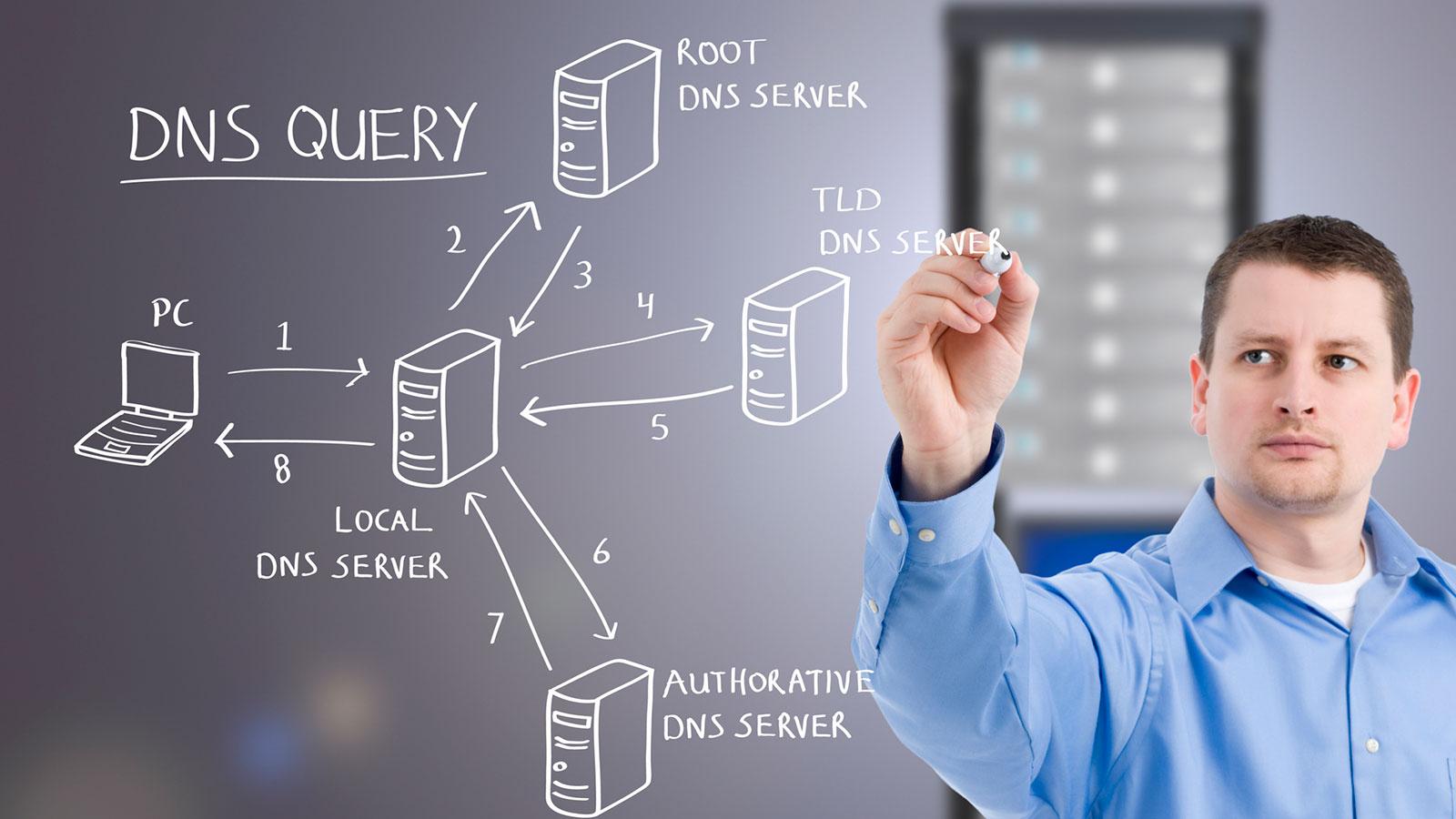
When you type a domain name into your browser, several systems work together to discover the corresponding IP address.
This process is known as DNS resolution.
Let's use www.example.com as an example.
Step 1: You Enter a Domain Name
You open your browser and type:
https://www.example.com
Your browser identifies the hostname, www.example.com, and needs to determine its IP address before connecting to the website.
Step 2: The Browser Checks Its DNS Cache
Before contacting an external DNS server, the browser may check whether it already knows the IP address associated with the domain.
If a valid cached DNS result exists, the browser may use it immediately.
Caching helps reduce repeated DNS lookups and improves performance.
Step 3: The Operating System Checks Its DNS Cache
If the browser does not have a usable cached result, the operating system may check its own DNS cache.
Some operating systems also consult local configuration files, such as the hosts file, which can contain manually defined hostname-to-IP mappings.
If the required information is not found, the system continues the resolution process.
Step 4: The DNS Resolver Receives the Request
The operating system sends a DNS query to a configured DNS resolver.
This resolver is commonly provided by an internet service provider or a public DNS service.
Examples of public DNS resolvers include:
-
Google Public DNS.
-
Cloudflare DNS.
-
Quad9.
The resolver is responsible for finding the requested DNS information.
If it already has a valid cached result, it can return the answer without performing a complete lookup.
Otherwise, it may need to contact other DNS servers.
Step 5: The Resolver Contacts a Root DNS Server
If the resolver does not already know the answer, it begins the DNS lookup process by contacting a root DNS server.
Root DNS servers are responsible for directing DNS resolvers toward the appropriate top-level domain servers.
For example, when looking up www.example.com, the root server can direct the resolver toward the DNS infrastructure responsible for the .com domain.
There are 13 logical root server identities, named A through M. However, these are supported by many physical server instances distributed globally through anycast technology.
Step 6: The Resolver Contacts a TLD Server
The resolver then contacts a Top-Level Domain (TLD) DNS server.
A TLD is the final part of a domain name, such as:
-
.com -
.org -
.net -
.edu -
.ng
For www.example.com, the TLD is .com.
The TLD server provides information about the authoritative DNS servers responsible for the requested domain.
Step 7: The Resolver Contacts the Authoritative DNS Server
The resolver now contacts an authoritative DNS server for example.com.
An authoritative DNS server contains the DNS records configured for the domain.
It can provide the requested information, such as the IP address associated with www.example.com.
For example, the server may return an A record containing an IPv4 address or an AAAA record containing an IPv6 address.
Step 8: The IP Address Is Returned
Once the resolver obtains the required DNS information, it returns the result to the requesting device.
The result may also be cached for a specified period.
The browser now has the IP address needed to proceed with establishing a connection to the website.
Step 9: The Browser Connects to the Website
With the IP address available, the browser can establish a network connection to the server.
For HTTPS websites, the browser also performs the necessary security negotiation to establish an encrypted connection.
The browser then sends an HTTP request, and the server responds with the requested website content.
This entire DNS resolution process can happen very quickly, often within milliseconds.
4. Understanding the Different Types of DNS Servers
DNS uses a hierarchical architecture involving several types of servers.
Each has a specific responsibility in the process of locating domain names.
A. DNS Recursive Resolver
A recursive resolver receives DNS queries from client devices and works to obtain the requested information.
It may answer from its cache or contact other DNS servers to find the result.
The resolver handles much of the work involved in DNS resolution, allowing users' devices to make relatively simple DNS requests.
B. Root DNS Servers
Root DNS servers sit at the top of the public DNS hierarchy.
They help resolvers identify which TLD servers should be contacted for a particular domain.
They do not normally provide the final IP address of the requested website.
Instead, they provide referrals to the appropriate next level of DNS infrastructure.
C. TLD DNS Servers
TLD servers manage information associated with top-level domain extensions.
For example, .com TLD servers provide referrals to authoritative DNS servers for registered domains under .com.
Different TLDs have their own DNS infrastructure.
D. Authoritative DNS Servers
Authoritative DNS servers contain the actual DNS records for a domain.
For example, the authoritative DNS servers for a website may provide:
-
The website's IPv4 address.
-
The website's IPv6 address.
-
Mail server information.
-
Domain verification records.
-
Other DNS configuration details.
These records determine how different services associated with the domain are located.
5. Understanding DNS Records
DNS does not only translate domain names into IP addresses.
It also stores different types of records that provide information about how a domain should operate.
These records are called DNS records.
Understanding them is important for website owners, network administrators, and web developers.
Here are some of the most commonly used DNS record types.
A Record
An A record maps a hostname to an IPv4 address.
For example:
example.com → 192.0.2.10When a browser requests the IPv4 address associated with the hostname, the DNS resolver can return the configured A record.
AAAA Record
An AAAA record maps a hostname to an IPv6 address.
IPv6 was developed to provide a much larger address space than IPv4.
For example:
example.com → 2001:db8::10CNAME Record
A CNAME record creates an alias from one hostname to another hostname.
For example:
www.example.com → example.comThis allows multiple hostnames to refer to the same canonical hostname.
A CNAME record points to another domain name rather than directly storing an IP address.
MX Record
An MX record identifies the mail servers responsible for receiving email for a domain.
For example:
example.com → mail.example.comMX records can also include priority values that determine which mail server should be preferred.
This is why DNS configuration is important when setting up professional email addresses.
TXT Record
TXT records store text-based information associated with a domain.
They are commonly used for:
-
Domain ownership verification.
-
SPF email authentication records.
-
DKIM-related information.
-
DMARC policies.
-
Third-party service verification.
TXT records are particularly important for email security and domain administration.
NS Record
An NS record identifies the authoritative nameservers for a domain or DNS zone.
For example, a domain may use nameservers provided by its hosting company or DNS provider.
These nameservers are responsible for answering authoritative DNS queries for the relevant zone.
PTR Record
A PTR record performs reverse DNS mapping.
Instead of translating a domain name into an IP address, it helps identify a hostname associated with an IP address.
PTR records are commonly used in email infrastructure, network administration, and diagnostic processes.
SRV Record
An SRV record identifies servers that provide particular services.
It can specify the hostname, port, priority, and weight associated with a service.
SRV records are used by certain communication protocols and service discovery systems.
6. What Is DNS Caching and Why Is It Important?
DNS caching is the temporary storage of DNS lookup results so that the same information does not need to be retrieved repeatedly.
Imagine visiting the same website several times in one day.
Without caching, your device might need to perform a new DNS lookup every time you visit.
This would create unnecessary network requests and additional delays.
DNS caching helps avoid this problem.
Different systems may cache DNS information, including:
-
Web browsers.
-
Operating systems.
-
Home routers.
-
Internet service provider resolvers.
-
Public DNS resolvers.
When a cached result is still valid, it can be reused.
Understanding TTL
TTL stands for Time to Live.
It determines how long a DNS record may be cached before another lookup is required.
For example, if a DNS record has a TTL of 3,600 seconds, it can generally be cached for one hour.
A shorter TTL allows DNS changes to be recognized sooner, while a longer TTL can reduce repeated DNS queries.
However, changing a DNS record does not guarantee that every device worldwide will immediately receive the new value.
Previously cached information may remain in use until its TTL expires.
This is one reason DNS changes can take time to become visible everywhere.
7. What Happens When DNS Stops Working?
DNS is essential for locating internet services.
When DNS resolution fails, users may be unable to access websites through their domain names, even when the servers hosting those websites are functioning correctly.
For example, imagine that your website is online and its hosting server is working properly.
However, if its DNS records are incorrect or its authoritative nameservers are unavailable, visitors may receive an error instead of reaching the website.
Some common DNS-related problems include:
DNS_PROBE_FINISHED_NXDOMAIN
This error generally indicates that the requested domain name could not be resolved.
Possible causes include an incorrect domain name, missing DNS records, or a domain that does not exist in the DNS system.
DNS Server Not Responding
This can happen when the configured DNS resolver is unavailable, unreachable, or unable to process requests.
Incorrect DNS Records
An incorrect A record, AAAA record, or CNAME record can direct visitors to the wrong destination or prevent a hostname from resolving.
Expired Domain Registration
If a domain registration expires, its DNS services may eventually stop working or be changed according to the registrar's policies.
Nameserver Configuration Problems
Incorrectly configured nameservers can prevent DNS resolvers from obtaining authoritative information about a domain.
Understanding these problems helps website administrators troubleshoot DNS-related failures more effectively.
8. Public DNS vs Private DNS
Not all DNS systems are designed for public internet access.
There are two important environments to understand.
Public DNS
Public DNS services allow users and devices to resolve domain names across the internet.
Examples include Google Public DNS, Cloudflare DNS, and Quad9.
These services are commonly used as alternative DNS resolvers to those provided by internet service providers.
Private DNS
Private DNS is used within organizations, private networks, and cloud environments.
It allows internal systems to resolve private hostnames that are not necessarily accessible through public DNS.
For example, a company may use internal DNS names to locate its employee management system, file servers, and internal applications.
Private DNS helps organizations manage internal network resources.
9. What Is DNS Propagation?
DNS propagation is a commonly used term describing the process through which DNS changes become visible to different resolvers and users.
Imagine changing the IP address associated with your domain because you are moving your website to a new hosting provider.
You update the relevant DNS record, but some visitors continue reaching the old server.
Why?
Because different DNS resolvers may still have the previous record stored in their caches.
As cached records expire and new lookups occur, more resolvers begin using the updated information.
The time required depends on factors such as previous TTL values, resolver caching behavior, authoritative DNS configuration, and the nature of the change.
This is why DNS changes should be planned carefully when migrating websites, changing hosting providers, or modifying email configurations.
10. DNS Security: Can Hackers Attack DNS?
Like other internet technologies, DNS can be targeted by cybercriminals.
If attackers compromise DNS infrastructure or manipulate DNS responses, users may be directed to malicious destinations or experience service interruptions.
Some common DNS-related attacks include:
DNS Spoofing
DNS spoofing involves providing false DNS information to mislead a resolver or client into connecting to an incorrect destination.
For example, a victim may be directed to a fraudulent website that imitates a legitimate service.
DNS Cache Poisoning
DNS cache poisoning occurs when an attacker manages to insert false DNS information into a resolver's cache.
Other users relying on the affected resolver may then receive incorrect DNS responses.
DNS Hijacking
DNS hijacking involves unauthorized changes to DNS settings or infrastructure.
An attacker may compromise a router, DNS account, registrar account, or other relevant component to redirect traffic.
DNS Amplification Attacks
DNS amplification is a type of distributed denial-of-service attack that abuses DNS servers to generate large amounts of traffic toward a victim.
Attackers may exploit open DNS resolvers and spoofed source addresses to amplify traffic.
How DNS Can Be Protected
Organizations can strengthen DNS security through several measures:
-
Protect domain registrar and DNS provider accounts with multi-factor authentication.
-
Restrict access to DNS management systems.
-
Monitor unexpected DNS record changes.
-
Use reputable DNS providers.
-
Configure DNSSEC where appropriate.
-
Apply secure network and resolver configurations.
-
Maintain reliable DNS backups and recovery procedures.
DNSSEC (Domain Name System Security Extensions) adds cryptographic authentication to DNS data, helping resolvers verify that DNS responses have not been improperly modified.
However, DNSSEC does not encrypt DNS queries or provide complete protection against every DNS-related attack.
11. What Are DNS Over HTTPS and DNS Over TLS?
Traditional DNS queries are often transmitted without encryption.
This means that, depending on the network environment, other parties may be able to observe DNS requests.
To improve DNS privacy, additional technologies have been developed.
DNS Over HTTPS (DoH)
DNS Over HTTPS sends DNS queries through encrypted HTTPS connections.
This helps protect DNS requests from being easily observed or modified by parties monitoring the network connection.
DNS Over TLS (DoT)
DNS Over TLS encrypts DNS communication using the Transport Layer Security protocol.
It provides an encrypted channel between a DNS client and a compatible resolver.
Both technologies improve the privacy and security of DNS communication, although they do not hide all information about the websites a user visits.
For example, the destination IP address and other network metadata may still reveal information about connections.
12. The Relationship Between DNS, Hosting, and Domain Names
Many beginners confuse domain registration, DNS management, and website hosting.
Although these services work together, they perform different functions.
Domain Registration
Domain registration gives you the right to use a particular domain name for a specified registration period.
For example, registering flowisetech.com allows you to use that domain while the registration remains active and complies with applicable policies.
DNS Management
DNS management controls the records that determine how the domain and its subdomains are resolved.
These records can direct website visitors to hosting servers and email services to mail servers.
Web Hosting
Web hosting provides the infrastructure where your website's files, applications, and databases are stored and processed.
For example, your website may be hosted on a server provided by a hosting company, while its DNS is managed through a separate DNS provider.
The three services work together to make a website accessible.
Changing your hosting provider does not necessarily require changing your domain name. You can update the relevant DNS records to point the domain to the new hosting infrastructure.
13. Why DNS Matters for Website Performance
DNS resolution is one of the early steps involved in accessing a website.
If DNS lookups are slow or unreliable, visitors may experience delays before the browser can establish a connection.
Several factors influence DNS performance:
-
DNS resolver response time.
-
Network latency.
-
DNS caching.
-
Nameserver availability.
-
Geographic distribution of DNS infrastructure.
-
DNS record configuration.
Website owners can improve DNS reliability by using reputable DNS providers, maintaining correct records, choosing suitable TTL values, and monitoring DNS availability.
Some DNS providers also use globally distributed infrastructure and anycast routing to direct DNS requests to nearby operational locations.
It is important to understand that faster DNS resolution alone does not guarantee a fast website.
Website performance also depends on hosting quality, server response times, image optimization, caching, frontend code, and network conditions.
14. The Future of DNS
As the internet continues to grow, DNS infrastructure continues to evolve.
Technologies such as DNSSEC, DNS over HTTPS, DNS over TLS, and modern distributed DNS infrastructure are helping improve the reliability, integrity, and privacy of domain name resolution.
Cloud computing, connected devices, artificial intelligence, and increasingly complex digital services also create new requirements for DNS.
Organizations need DNS systems that can support global availability, efficient service discovery, security, and large-scale traffic management.
Although DNS is often invisible to everyday internet users, it remains one of the most important systems supporting the modern digital world.
Conclusion
The Domain Name System is a fundamental part of how the internet works.
It translates human-readable domain names into IP addresses, allowing browsers and applications to locate the servers and services they need.
Behind every website visit, DNS may involve recursive resolvers, root servers, TLD servers, authoritative nameservers, caching systems, and different types of DNS records.
Understanding DNS helps explain how websites become accessible, why domain configuration matters, how hosting services connect to domain names, and what happens when DNS stops working.
For web developers, network administrators, cybersecurity professionals, and technology enthusiasts, DNS is an essential concept to understand.
The next time you type a website address into your browser, remember that before the website appears on your screen, the Domain Name System has helped your device discover where to find it.